Thursday, 4 September 2014

Cisco 7700 VS 7000 Nexus switch


7700 is the advance version of 7000 switch with more capacity. Below are the three 77K  series models :-

7702
  • Up to 5 Tbps
  • 3 rack-unit
7706
  • Up to 21 Tbps
  • 9 rack-unit
7710
  • 42 terabits per second (Tbps)
  • 14–rack-unit form factor
7718
  • 83 terabits per second (Tbps) 
  • 26 rack-unit
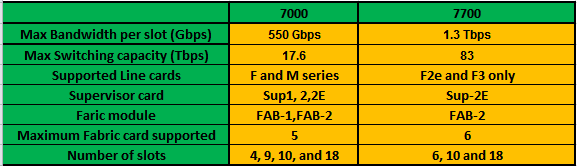
What is the difference between nexus 7000 and 7700?

Below is the comparison between 7000 and 7700 nexus switch.


Note:- 7K and 77K line cards, Fabric Modules and Supervisor module are not interchangeable. We cannot use 7000 SUP-2E in 77K and vice versa.


Wednesday, 3 September 2014

XL vs non XL M cards- 7000 Nexus

M1 card are primary used for L3 functionality.M1 card can also perform basic Layer 2 function. It cannot perform advance Layer 2 feature like Fabricpath and FCOE.

M1 line card comes with two version XL and non XL version. Both have the same architecture, the only difference between them is the memory to handle TCAM, FIB and mac address.

Below table shows the comparison between the XL and non XL card. XL needs a license in order to increase its capacity. Without License there is no performance difference between XL and non XL card.

I got the below information from Cisoc document.


How to recognize the XL line card?

By looking at the Line card model number you can identity whether it is a XL or non XL card. XL card has a word “ L “ in the end of the model number like N7K-M132XP-12L. But without license it will have same capability as in non XL card.

SCALABLE_SERVICES_PKG is required to extract the full capacity of the card. It is installed per system which enables all the XL capable cards in the chassis. It increases the performance of the following features:-
·         IPv4 routes
·         IPv6 routes
·         ACL entries
·         Mac address table

Note:- To work in XL mode all card in a vdc must be XL capable otherwise it will work in non XL mode only.

Tuesday, 2 September 2014

Shared Vs. Dedicated port mode in Nexus 7000

I took the example of line card N7K-M132XP-12 to explain the dedicated and shared mode.

Please refer to the below architecture of the line card. I got this from Cisco document.


As you can see there is a 4:1 MUX which combines traffic from four ports and send it to replication engine via one 10Gig link. It means all four ports cannot send individual 10 Gig traffic at the same time. 10 Gig of connectivity is shared between the four ports. It is called oversubscription. As we can notice this card has 4:1 oversubscription.

Which ports will share the BW is dependent on the model of the card. There are cards available which don’t have any oversubscription and hence can send data on the line rate.

As mentioned above port grouping varies from card to card. Here 10Gig of BW is shared as shown below
1, 3, 5, and 7
2, 4, 6 and 8
And so on ….

                                             
                                                     Shared Mode                                           Dedicated Mode     


Shared Mode: It is the default mode where 10Gig of capacitiy is shared by group of ports.
Below is the  command to configure the port in shared mode. Generally we require it when we convert the port from dedicatd to share.

Switch(config)# Interface Eth3/1
Switch(config-if )# rate-mode shared

Dedicated Mode: In this mode, 10Gig of bandwidth can be allocated to one port of the group and rest will be disabled.  Below is the command to allocate the 10Gig of BW dedicated to a port.

Switch(config)# Interface Eth3/1
Switch(config-if )# rate-mode Dedicated

M series card architecture - Cisco Nexus 7000


M-series card is used for L3 purpose like routing ACLs. We must have at least one M1 card in the chassis to get the routing or L3 facility. Otherwise we cannot create SVI s and do inter vlan communication.

To check the available model and their feature, please refer


Below is the architecture of the M-series card. Please note different M-series cards can have the different architecture.

Below is the architecture diagram of N7K-M132XP-12, N7K-M132XP-12L.


The components are explained below:-

FABRIC :- It is not the fabric on chassis but each card has its own fabric which connects the Module to the backplane fabric cards. Number of fabric present varies as per the cards.

More number of fabrics present in the card more backplane throughput card is. Each fabric has five interfaces to connect to the chassis fabric cards.

FORWARDING ENGINE:- All packet forwarding decision on th card are taken by forwarding engine. It stores the FIB and TCAM table and take the packet flow decision.

REPLICATION ENGINE:- It is used to replicate the packets as and when required. It is not only used while port mirroring but also when the card receives the multicast, broadcast or unknown broadcast.

Since the same replication engine is responsible for multicast, there is a limit on the packet replication that a card can handle so if the multicast replication is extremely high it can choke the replication engine, although it will never happen in normal circumstances.

VOQs :- VOQs stand for VIRTUAL OUTPUT QUEUE. It is a high speed memory to queue the packets so that it will not overrun the fabric. VOQs are controlled by central arbitrator siting in the supervisor module.

Its basic function is to  provide  buffering and queuing

EOBC:- EOBC stands for ETHERNET OUT-OF-BAND CHANNEL. Supervisor module has 24 port local switch and through this it is connected to each line card and fabric modules. It is of 1 gig capacity.


EOBC is used to connect local CPU on line card to both supervisor modules and the other line cards. Each line card has two EOBC connections to the supervisor module.

LC CPU :-  Each Line has its own in build small CPU. And it is connected to the Supervisor CPU via EOBC

10G Mac:- It receives the packet from the interface and then encode the data and send it to replication engine

4:1 MUX + LINKSEC: - It  does the  multiplexing and de-multiplexing job  of the data coming in or out from the four ports to the one 10Gig connectivity to the backplane. This over subscription varies as per the card model. It also performs the function of linksec and encodes and decodes the data.

 Central arbitration: – It controls the traffic coming in/out the Cross fabric based on priority, available bandwidth.


Crossbar fabric: – It provides dedicated, high-bandwidth interconnects between ingress and egress I/O modules

Please refer to Cisco document for more information.
Monday, 1 September 2014

Difference between M-series and F-series card in Nexus 7000.

Cisco Nexus line cards are of two types: - M series and F series.

M card is basically used for L3 purpose like routing etc. whereas F series card was originally a Layer2 card. New third generation of F-series can support L3 features like MPLS, OTV etc.

Below is the list of M-series and F-series cards:-

M-series:-


Few key points 
  • All Cards supports OTV
  • FCOE and fabricpath not supported in M-series cards.
  • VPC is supported in all cards.
  • All M2 series cards and only one M1 cards N7K-M132XP-12L supports FEX whereas other M1 cards don’t support Fex connectivity.
  • Below are the current M-series cards.
a) M1 cards:-

  • N7K-M148GS-11L            
  • N7K-M148GT-11L            
  • N7K-M108X2-12L            
  • N7K-M132XP-12L            
b) M2 card:-

  • N7K-M224XP-23L
F series:-


Few key points :
  • All F-series cards support VPC.
  • Fex is also supported in all F cards.
  • FCOE and Fabricpath is also supported in all cards.
  • OTV, LISP, MPLS is only supported in F3 cards.
  • M-Series Interoperability in same VDC is only supported with F2e and F3 cards.
  • Below are the current F-series cards.
a) F1 Card:- F1 card is now end of sale and end of life.
  •  N7K-F132XP-15  
b) F2 card:-
  • N7K-F248XP-25
b) F2e cards:-
  • N7K-F248XP-25E              
  • N7K-F248XT-25E
c) F3 card:- 
  • N7K-F312FQ-25
There are various model available for not M and F-series and question is can we get any detail by looking at the model number like What is 12 in N7K-M132XP-12L?

Below is the chart which explains the fields in the model number of Line cards. By looking at it you can drive the fields in all available line cards.


Note:

1. There is a separate Fabric in the line card as well. Don't confuse it with the fabric present in the chassis.

2. Number of Fabric card required to support the card can be calculated as:-

Like this card supports 480 Gbps backplane BW, so to get the full BW we need 5 (no. of Fabric cards) *110( BW of each Fbaric card - FAB-2) =550Gbps of fabric speed and hence require 5 fabric card in the chassis.

Nexus Line card Naming Conventions


In the below chart I tried to explain the fields present in the Nexus line card model number. I have taken N7K-F248XT-25E as an example but you can drive the details of any line card using it.


What is GGSN ?


GGSN – Gateway GPSR support Node is the mobility anchor point within the mobile packet core network. It provides connectivity to the SGSN (Serving GPRS support Node) and PDN (Packet data network). Session state information of the subscriber is always maintained at the GGSN. It also maintains the necessary information required to route the user traffic towards the SGSN and PDN.

GGSN is mostly located in the service provider network so even if the subscriber is in roaming location or in the home network, he will be connected to the GGSN located in the home network.


Key functions of GGSN

  • Process PDP request from SGNSs in both home and foreign PLMN network. After the subscriber is     attached to the network, it will initiate the PDP activate procedure.
  •  Assign an IP address to the subscriber - A subscriber could have maximum of 11 PDP context and secondary PDP context. Each subscriber should have at least one primary PDP context in order to access the services with the PRD network. The secondary PDP context would create depending on the type of application the subscriber is accessing. Depending upon the application, the bandwidth requirement may be higher, due to which the secondary PDP context will be created. It depends on the type of application as the application may need more bandwidth which was negotiated in primary PDP context. For every primary PDP context, the GGSN will assign the IP address since the secondary PDP context will be associated with the primary PDP context and therefore GGSN will not assign an IP address to secondary PDP context.
  •  Negotiate QOS – For any given subscriber session the GGSN will negotiate the QOS parameter with SGSN as a part of PDP activation procedure and during any PDP modification procedure.
  • Dynamic Policy control – GGSN has interface Gx towards the PCRF. This is used for policy control and charging rule function. This function helps the GGSN to charge the subscriber as per the QS policy. Depending upon the type of subscription, PCRF can negotiate various types of QOS policies to the subscriber and install different charging rules.
  • Performs prepaid / postpaid billing – using the Gy interface GGSN performs the prepaid billing, using the OCS - Online charging server and performs the postpaid billing towards the Charging gateway function.
  • GGSN also authenticates users to perform the authentication using AAA, OCS and PCRF since all of these maintain a database with the user subscription.
  • GGSN also provides secure VPN tunnel connectivity of corporate subscriber towards the corporate PDN network. Tunneling mechanism such as GRE, IPSEC, L2TP tunneling can be used for setting up the tunneling interface on the Gi interface.


GGSN  interface types –

  • Gn/Gp interface – Used by GGSN to communicate with SGNSs within the home/PLMN network. This interface is based on the GPRS tunneling protocol (GTP). It uses the GP interface towards the SGSN within the foreign PLMN network. This interface carries both Data and signaling plane traffic for a subscriber PDP session. It uses GTP-C for control signaling and GTP-U for user data traffic.
  • Gx Interface – It is used to communicate with te PCRF and its bases on the diameter protocol.
  • Gy Interface – This interface is used between GGSN and OCS. It is based on the diameter protocol used for prepaid billing.
  • Ga/Gz interface – As per the 3GPP standard, the Gz interface between CTF (charging trigger function) and CDF (charging data function). The CDF is a proxy between GGSN and CGF. The interface between the CDF and CGF is known as Ga interface.
  • Gi Interface – This interface is between GGSN and PDN. It routes the traffic towards the PDN for the services offered within PDN. This interface carries both uplink and downlink subscriber data.
  • DHCP interface – This interface goes towards the DHCP server. The GGSN can use this interface if external server is to be used for assigning IP addresses to the subscribers.
  • GC interface – This interface goes towards HLR via GTP – MAP protocol converter. It is used during network initiated PDP activation procedure.
  • AAA – This interface goes towards AAA server. It’s based on radius protocol and used for authentication and accounting.