The main difference between single-mode and multimode fiber optic cables lies in how they transmit light and the distances they can cover:
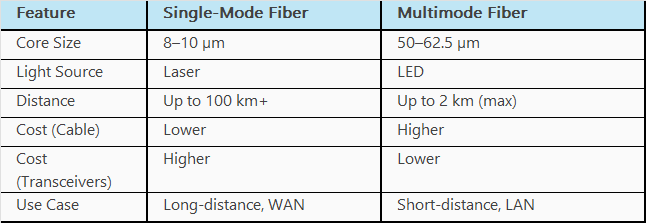
The main difference between single-mode and multimode fiber optic cables lies in how they transmit light and the distances they can cover:
Unlike a Cold Standby APIC, which remains inactive and holds no data until it is promoted to active, a Warm Standby APIC continuously synchronizes data from the active APIC nodes while remaining in standby mode. This ongoing synchronization ensures that, in the event of data loss across the APIC cluster, the Warm Standby can be used to restore the cluster, even if parts of the distributed database are permanently lost.
Note - From 6.1(2), standby APIC can be setup as Warm standby APIC.
How to set up encryption of both current and new pre-shared keys in a router.
Router(config)#key config-key password-encrypt Ourkey123
Router(config)#password encryption aes
Securing your Cisco APIC server starts with a strong BIOS password. Whether you're setting it up for the first time or updating it, here’s a quick walkthrough to change the BIOS administrator password.
Step-by-Step Guide
Complete one of the following to recertify:
Below are the SLA parameters for Video and Voice.
Recommended network SLA for video[4] is as follows:
Incidentally the recommended network SLA for transporting audio are:
Step
1: Wipe the switches.
Spine201# setup-clean-config.sh
In progress
In progress
In progress
In progress
In progress
Done
Spine201#
Step
2: Wipe the APICs.
Run the following commands on each APIC:
apic# acidiag touch clean
This command will wipe out this device. Proceed? [y/N] y
apic# acidiag touch setup
This command will reset the device configuration, Proceed?
[y/N] y
Step
3: Reload the APICs.
apic# acidiag reboot
This command will restart the this device, Proceed? [y/N] y
Step
4: Reload the Switches.
Step
5: Reconfigure the APICs.
