Sunday, 7 September 2014

DHCP option 43 for Cisco WLC


Setting up Switch to work as a DHCP server for AP with option # 43

Scenario – WLC is connected in a network on Mgmt.(inline) interface – say - Vlan 100 and APs are connected at the access layer on Vlan 200. You want the APs to boot up and get an IP address from the DHCP and along with that you can set the option # 43 to assign the Wireless Lan controller (WLC) management ip address. By doing this, as soon as the DHCP will send the IP address to the AP, it will also send WLC information, the AP needs to join. The dhcp scope in this scenario is defined on the switch where you have the WLC and APs terminating, on different interfaces and different Vlans.

Configuration steps on switch.

1.       Create vlan 100 for WLC management on switch1 and assign a port into that Vlan and connect your switch

Vlan 100
name WLC_MGMT

Vlan 200
name AP_MGMT

interface vlan 100
WLC_MGMT_VLAN
ip address 10.10.10.1 255.255.255.0
no shut

interface vlan 200
description AP_MGMT_VLAN
ip address 192.168.50.1 255.255.255.0
no sh


interface g1/0/1
description  ##### -Connected to WLC-#####
switchport
switchport mode trunk
switchport trunk all vlan 100,200
no sh


interface g1/0/10
description  #####- Connected to AP1-#####
switchport
switchport mode access
switchport access vlan 100
no sh

interface g1/0/11
description  #####- Connected to AP2-#####
switchport
switchport mode access
switchport access vlan 100
no sh
               
2.       Configuration step on WLC

a.       On WLC, go to controller – interface ( on left side) and click on management interface
b.      Assign the IP address 10.10.10.5, netmask – 255.255.255.0 and gateway – 10.10.10.1

Setting up DHCP Pool configuration on switch1

ip dhcp pool APvlan200
network 192.168.50.0 255.255.255.0
default-router 192.168.50.1
option 43 hex f104.0a0a.0a05 ---------< check below to understand the conversion

Converting decimal to Hex and using it in the above command (DECIMAL to HEX)

NOTE – f104 will be default and rest of the value will come after conversion. Check the conversion example below
IP to be converted – 10.10.10.5

Open the calculator in the programmer mode and click Dec and type 10 after typing 10 click on Dec (option below that) the value will be “A”. So use it as 0A

Now 10 becomes – 0A

And now convert 5 into hex like before; it will come as ‘5’ so use it as 05.

The hex conversion of the above ip is – 0A.0A.0A.05.

Now break it slots of 4 and make sure to prepend it with f104 in case of one controller and prepend it with f108 for two controllers. The final hex value will look like this

f1040a0a0a05

In case we need to configure two controllers with IP address 10.10.10.5 and 10.10.10.6. The hex value for option 43 will become f1080a0a0a050a0a0a06. The prepend value in case of two WLC will become f104 * 2 = f108.

By following the above steps your APs should start getting the IP addresses and WLC information. 

To check the reachability, try to ping the AP from your WLC and you should be able to ping it and do it vice-versa. Once the AP is booted properly, it should join the controller. If still not, then make sure you are not running with the issues like MIC check, mac-filtering or mac list authentication etc. under the AP policies in security tab.


Saturday, 6 September 2014

Migration from FAB- 1 to FAB-2 in 7000 Nexus switch

Before thinking to migrate the Fabric module please check the data sheets for both fabric modules in order to compare their features and limitations.

Please use the below link to check the difference between FAB-1 and FAB-2.


Fabric cards can be replaced one by one without any disruption. Both cards can work well together but it is not recommended for longer time.


If all Fabric modules are not replaced within 12 hour of the first card installation then switch will generate the syslog warning messages to complete the migration.


Thursday, 4 September 2014

Difference between 5548P and 5548UP?

In both 5548UP and 5548P, It has 32 ports in fixed slot 1 and 16 ports in expansion module i.e slot 2.

In 5548P, we can only have 16 FC ports which are on expansion module. We cannot convert Ethernet port in fixed slot to FC whereas in 5548UP all 48 ports (including 32 fixed port + 16 expansion module ports) can be converted as native FC ports.

Each time we convert Ethernet port in fixed module to FC or vice versa, requires a switch reboot whereas ports on expansion module can be converted by rebooting only the expansion module without impacting the traffic of fixed module ports.

Below is the command to reboot only the expansion module:-

Slot 2
Copy run start
port 1-16 type fc
Poweroff module 2
No poweroff module 2


NOTE: - It will take few minutes to show the FC ports after conversion and all 48 ports in both switches can support FCOE.

5548P is now EOL and replacement model is 5672UP.


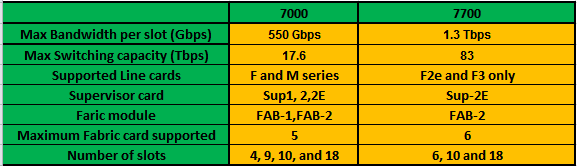
Cisco 7700 VS 7000 Nexus switch


7700 is the advance version of 7000 switch with more capacity. Below are the three 77K  series models :-

7702
  • Up to 5 Tbps
  • 3 rack-unit
7706
  • Up to 21 Tbps
  • 9 rack-unit
7710
  • 42 terabits per second (Tbps)
  • 14–rack-unit form factor
7718
  • 83 terabits per second (Tbps) 
  • 26 rack-unit
What is the difference between nexus 7000 and 7700?

Below is the comparison between 7000 and 7700 nexus switch.


Note:- 7K and 77K line cards, Fabric Modules and Supervisor module are not interchangeable. We cannot use 7000 SUP-2E in 77K and vice versa.


Wednesday, 3 September 2014

XL vs non XL M cards- 7000 Nexus

M1 card are primary used for L3 functionality.M1 card can also perform basic Layer 2 function. It cannot perform advance Layer 2 feature like Fabricpath and FCOE.

M1 line card comes with two version XL and non XL version. Both have the same architecture, the only difference between them is the memory to handle TCAM, FIB and mac address.

Below table shows the comparison between the XL and non XL card. XL needs a license in order to increase its capacity. Without License there is no performance difference between XL and non XL card.

I got the below information from Cisoc document.


How to recognize the XL line card?

By looking at the Line card model number you can identity whether it is a XL or non XL card. XL card has a word “ L “ in the end of the model number like N7K-M132XP-12L. But without license it will have same capability as in non XL card.

SCALABLE_SERVICES_PKG is required to extract the full capacity of the card. It is installed per system which enables all the XL capable cards in the chassis. It increases the performance of the following features:-
·         IPv4 routes
·         IPv6 routes
·         ACL entries
·         Mac address table

Note:- To work in XL mode all card in a vdc must be XL capable otherwise it will work in non XL mode only.

Tuesday, 2 September 2014

Shared Vs. Dedicated port mode in Nexus 7000

I took the example of line card N7K-M132XP-12 to explain the dedicated and shared mode.

Please refer to the below architecture of the line card. I got this from Cisco document.


As you can see there is a 4:1 MUX which combines traffic from four ports and send it to replication engine via one 10Gig link. It means all four ports cannot send individual 10 Gig traffic at the same time. 10 Gig of connectivity is shared between the four ports. It is called oversubscription. As we can notice this card has 4:1 oversubscription.

Which ports will share the BW is dependent on the model of the card. There are cards available which don’t have any oversubscription and hence can send data on the line rate.

As mentioned above port grouping varies from card to card. Here 10Gig of BW is shared as shown below
1, 3, 5, and 7
2, 4, 6 and 8
And so on ….

                                             
                                                     Shared Mode                                           Dedicated Mode     


Shared Mode: It is the default mode where 10Gig of capacitiy is shared by group of ports.
Below is the  command to configure the port in shared mode. Generally we require it when we convert the port from dedicatd to share.

Switch(config)# Interface Eth3/1
Switch(config-if )# rate-mode shared

Dedicated Mode: In this mode, 10Gig of bandwidth can be allocated to one port of the group and rest will be disabled.  Below is the command to allocate the 10Gig of BW dedicated to a port.

Switch(config)# Interface Eth3/1
Switch(config-if )# rate-mode Dedicated

M series card architecture - Cisco Nexus 7000


M-series card is used for L3 purpose like routing ACLs. We must have at least one M1 card in the chassis to get the routing or L3 facility. Otherwise we cannot create SVI s and do inter vlan communication.

To check the available model and their feature, please refer


Below is the architecture of the M-series card. Please note different M-series cards can have the different architecture.

Below is the architecture diagram of N7K-M132XP-12, N7K-M132XP-12L.


The components are explained below:-

FABRIC :- It is not the fabric on chassis but each card has its own fabric which connects the Module to the backplane fabric cards. Number of fabric present varies as per the cards.

More number of fabrics present in the card more backplane throughput card is. Each fabric has five interfaces to connect to the chassis fabric cards.

FORWARDING ENGINE:- All packet forwarding decision on th card are taken by forwarding engine. It stores the FIB and TCAM table and take the packet flow decision.

REPLICATION ENGINE:- It is used to replicate the packets as and when required. It is not only used while port mirroring but also when the card receives the multicast, broadcast or unknown broadcast.

Since the same replication engine is responsible for multicast, there is a limit on the packet replication that a card can handle so if the multicast replication is extremely high it can choke the replication engine, although it will never happen in normal circumstances.

VOQs :- VOQs stand for VIRTUAL OUTPUT QUEUE. It is a high speed memory to queue the packets so that it will not overrun the fabric. VOQs are controlled by central arbitrator siting in the supervisor module.

Its basic function is to  provide  buffering and queuing

EOBC:- EOBC stands for ETHERNET OUT-OF-BAND CHANNEL. Supervisor module has 24 port local switch and through this it is connected to each line card and fabric modules. It is of 1 gig capacity.


EOBC is used to connect local CPU on line card to both supervisor modules and the other line cards. Each line card has two EOBC connections to the supervisor module.

LC CPU :-  Each Line has its own in build small CPU. And it is connected to the Supervisor CPU via EOBC

10G Mac:- It receives the packet from the interface and then encode the data and send it to replication engine

4:1 MUX + LINKSEC: - It  does the  multiplexing and de-multiplexing job  of the data coming in or out from the four ports to the one 10Gig connectivity to the backplane. This over subscription varies as per the card model. It also performs the function of linksec and encodes and decodes the data.

 Central arbitration: – It controls the traffic coming in/out the Cross fabric based on priority, available bandwidth.


Crossbar fabric: – It provides dedicated, high-bandwidth interconnects between ingress and egress I/O modules

Please refer to Cisco document for more information.