Sunday, 12 October 2014

Fabric Login Process - Storage Basics-9

Below are the three login processes which are responsible for the creation and maintenance of communication link between initiator and target.

  1. Fabric Login:- It is known as FLOGI. It establishes the session between N-port and F-port. It is mandatory process for point-to-point and Fabric topology, without it N_port will not able to send or receive data. It is optional for Arbitrated loop. It performs below function so that N_port can register to the fabric.
  • As soon as N_port is connected to F_port, it will register itself in the fabric by sending the fabric login request. In return F_port will assign a 24-bit FCID to the N-port.
  • N_port also negotiate the link flow control parameter i.e. Buffer-to-Buffer credit with F_port.
  • If N_port and F_port supports authentication then they are negotiate the authentication parameters during FLOGI.
   N_port sends the Flogi frame (containing WWNN, WWPN and B2B credit) to a well-known address of 0xFFFFFE. In return switch will send the accept frame (ACC).

  2. N-Port Login:- It is also known as PLOGI. It creates a FC4 session between the end devices.  It is responsible to create and maintain the session between two N-Port. During PLOGI, N_port will negotiate the end-to-end credit. PLOGI also enables N_port to learn other characteristics like WWNN, WWPN etc. of other end N_port.

N_port sends the PLOGI on a well-known address of 0xFFFFFC.

  3. Process Login:- Also known as PRLI. It creates and maintains a session between two FC4 processes that are connected via two different N_port between initiator and target.

Disk Subsystem Components - Storage Basics-3


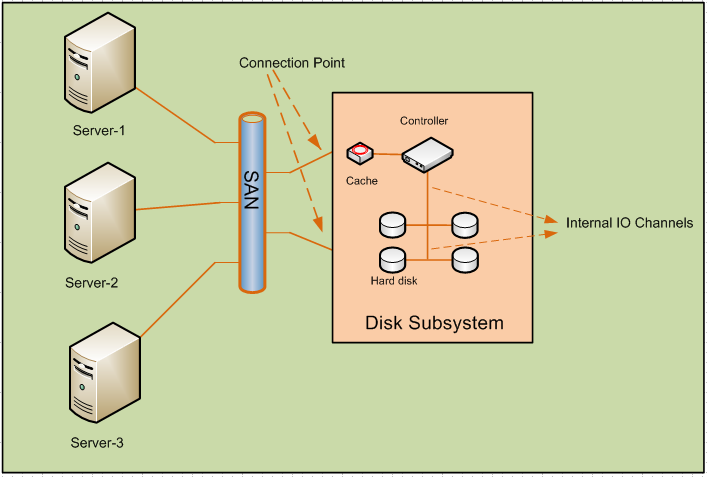
Every intelligent Disk subsystem consists of the below components.


1.SAN:- Server can be connected either directly to the disk subsystem or indirectly via Storage area network. SAN can be made up of SCSI, Fibre channel or iSCSI infrastructure.

2.Connection Points:- Servers are connected to Disk subsystem via connection points. Each subsystem must be connected more than one connection point to provide redundancy. Small Storages have one or two connection points and 6 to 8 hard disks.


3.Controller:- Disk controller are used to handle write and read operation to/from hard disks. With the help of controller, entire disk array appeared as one virtual hard disk to the servers.

Server sends the blocks of data to the controller and its controller responsibility to distribute the data to internal hard disk.

4.Hard disk:-This is the place where actual data is stored. It is very critical to choose the size of the Hard disk as it will limit overall maximum capacity of the storage. More disk in the storage means more read/write heads which will increase the throughput but then maximum capacity of the system will reduce. Application with high throughput will require hard disk with smaller space.

5. Internal IO channels: - It can use vendor proprietary methods or standard IO method i.e SCSI, FC etc.  to connect the controller and internal hard disks.

There are various design methods of Internal IO channel in order to provide redundant path between controller and hard disks.
  •    Active: - Every hard disk is connected to controller only via single IO channel. If it is broken hard disk will be isolated from Controller.
It is the cheapest and simplest method to provide the connectivity but not recommended as there is no redundancy.


  •    Active/Passive: - There are two traces of IO channel but only one path is active at a time. If primary link is down then controller will use backup link to read and write data to the hard disks.


  •    Active/Active No- Load Balancing :- Both the Channel traces are active but hard disk is only using one trace and keeping the other channel as backup.
As shown below Channel-1 is active only for hard disk 1 -3 whereas it is used as backup for Hard disk-2 and 4. Similarly Channel-2 is active for Hard disk 2and 4 and is used as backup for Hard disk1-3.


  •    Active/Active Load Balancing: - All hard disks are connected to controller via two separate IO channels and both the channel is used to perform read and write operation by the controller.
It is the best method to provide high fault tolerance.


6. Cache:- It is used by the controller to increase the read and write speed. There are two types of cache.
  •     Cache on the hard disk:- Generally the speed of IO channel are higher than the speed at which controller can write on the hard disk. So the data is being cached by the hard disk to make IO channel free and can be used for the data towards other hard disks.
  •     Cache on the controller:-Controller has its own cache which caches all the data sent by the servers and allow other servers to send data on the free channel. Controller has its own battery to protect data lose due to power failure.

Fibre channel Protocol stack - Storage Basics-8

 There are five layers in FC protocol stages which are quite similar to the OSI layer.


1. FC0:- It is equivalent to the physical Layer in OSI model. It belongs to the physical layer and defines the cable and connector used for the FC traffic. It sends the data in the form of bits “0” and “1” sequentially.

FC hubs are working in FC0 layer.

2. FC1:- It is responsible for the data encoding. It ensures the data error correction will be done in case of error.
It also performs the link creation and maintenance. It is equivalent to data link layer of OSI model.

8b/10b encoding is used in 1Gig, 2Gig, 4Gig, 8Gig whereas 10Gig and 16Gig standard uses 64b/66b encoding.

3. FC2:- It is the most important layer in FC protocol stack which perform various critical functions. It is equivalent to network OSI layer and is defined in FC-PI-2 standard.
FC switches works on FC2 layer.

FC2 layer performs the below functions:-

  A. Data block size handling: -   It defines how big data payloads   can  be send over the network.  Below are the few key words:-
  • Exchange:- Exchange is the session built between end machines to transmit and receive data. There can be multiple Exchanges between the hosts.
  • Sequence: - Payload or data is made up of big data units called sequence. It ensures the correct order of delivery as well and eliminates the out of order issues.
  • Frames: - Since each link can only sent a defined amount of data size. The big data blocks are broken down to smaller chucks known as Frames. Frames can consist of up to 2112 bytes. If one frame is lost then the entire sequence has to be retransmitted


FC2 not only ensures that the frame has been received successfully at the receiver end but it also makes sure that the frames are been sent or received in sequence.

B. Flow control: - It provides the flow control to avoid the situation at the receivers end and is known as credit limit. It makes sure that both transmitter and receiver are in sync and transmitter will not overload the receiver. It performs two types of flow control:-
  • Buffer-to-buffer credit: - It is also known as link flow control in which both end of the link negotiate data speed.
  • End-to-End flow control:- In End-to-End flow control, the speed is negotiated between transmitter and receiver
C. Addressing:-  Each device in the fabric has its own unique WWNN (world wide node name) and each port gets a 64-bit address called WWPN (world wide port name). As soon as port is up neighbor switch will assign a 24 bit value called FCID to it.

4. FC3:- It performs the below mentioned services as mentioned below. It is not used in FC protocols and can be used by using additional software but not implemented yet.
  • Encryption
  • Mirroring or RAID
  • Compression
5. FC4:- It is used to map the protocol data to the below layer. It encapsulates the data units and sends it to FC2 to perform the lower layer functions.

What is Mirroring? - Storage Basics-7

Mirroring is the process to provide redundancy. Data will be mirrored from one disk to another so that it can provide the fault tolerance in case of disk failure:-

There are two types of mirroring as mentioned below:-

1. Instant Copying: - It mirrors the data locally to the different hard disk in the same enclosure. It can provide redundancy but to a limited extend as it cannot prevent data lose at the time of complete enclosure failure.
2. Remote Mirror: - In remote mirroring, the data will be copied to the hard disk on the different enclosure which may be located on different data center.

·       Synchronous Remote Mirroring: - In synchronous mirroring, server sent the data to the disk-1 and then it mirror the data to Disk-2.  Disk- will only send the acknowledgement to server only after complete mirroring of data.


·       Asynchronous Remote Mirroring:- In asynchronous mirroring, Disk-1 will send the acknowledgement to server once all the data is written on it and simultaneously it will mirror the data to Disk-2. Disk-1 will not wait for the acknowledgement from disk-2 and will send the acknowledgement to server.

What is LUN masking? - Storage Basics-6

Controller abstracts all the physical disks to a single virtual disk and hence all servers will be able to see all the hard disk. Error generated by one server can impact the complete disk subsystem. LUN masking is the method by which servers will get access to the space they are allowed to. Server cannot read and write on the LUN allocated to other server.

LUN is a kind of filter which restricts the access between server and storage. There are two types of LUN masking:-

1.Port based LUN masking:- In port-based based LUN masking server will see all the disks attached to the storage port. It is not recommenced as there is no restriction between server and hard disks.

2.Server based LUN Masking:- Server will see only its own disk. It will not allow server to see or access the other disks.

What is JBOD? - Storage Basics-5

JBOD is just bunch of disk where all the disks are installed in an enclosure with common power supply. There is no controller present in JBOD and hence it cannot provide any RAID capability. Generally it has either 8 or 16 disks. Server will see each disk as independent disk and each require its own address.


Standard IO technique like SCSI and FC arbitrated loop can be used to connect to JBOD. As shown below all disks are connected in a ring to provide resiliency


It is similar to the hub topology where are the devices are connected in half duplex.  Only one device can transmit at a time and hence the total bandwidth is shared between all devices.

What is RAID? - Storage Basics-4

RAID stands for Redundant Array of Independent Disk. It is a method used to store the data efficiently onto the hard disk. It gives the method that not only distribute the data on various disks but also provide the mechanism which helps in providing the redundancy.

To understand the RAID methods we must understand the below terms:-

A. Stripping: - Stripping is the way to divide the incoming data by the controller and then distribute it to the various back end available hard disks. It provides load balancing of data to different hard disks.
B. Redundancy: - Redundancy enables us to restore the data in case of hard disk failure. Before writing the data to hard disk, controller creates two copies of it and then stores the redundant to different disk. It is also known as mirroring.
C. Parity:- Controller collect the data from the servers and then run an algorithm which results a value, similar to checksum ,called parity  and store it in a particular disk. In case of disk failure, data can be recovered with help of parity and remaining disk data.

  1. RAID0:- Incoming data from the server to controllers are being stripped by the controllers and then distributes the data to various hard disks. 
  
   In RAID0, there is no mechanism to provide redundancy as mirroring is not involved. It doesn't provide any fault tolerance and data will be lost in case of hard disk failure.


Advantage:-
  • Data is load balanced between the hard disk and hence both the hard disks are equally loaded.
  • High performance - Controller can write and read from the hard disk simultaneously which increases both the read and write performance.
  • Less number of hard disk required to store the data as all the data is shared between the hard disk.
Disadvantage:-
  • No fault tolerance mechanism is involved. 
  2. RAID1:-In RAID 1, data will be mirrored by the controller and then store in both the hard disk. Data can restored in case of hard disk failure.
   

   Advantage:-
  • Mirroring is involved to provide fault tolerance.
   Disadvantage:-
  • Wastage of memory - It requires double space of the actual data size as one disk is require to store the redundant data.
  • Less performance: - As the data has to be replicated and write to another disk, it is less efficient. It decreases the write speed whereas read speed is increases.
  • IO channel utilization: - Twice the original data is transferred by IO channel which will increase the IO channel utilization.
  3. RAID01:- Mirrored and then stripping.

In RAID01, controller creates two virtual disk consists of hard disks. Both the virtual disks are again virtualized as one and hence server will see only one hard disk.

Data received from server is first mirrored to the two virtual disks and then stripped between the physical hard disks.


Advantage:-
  • Read performance is high as both the virtual disk can handle the read requests.
Disadvantage:-
  • Failure of one hard disk will result in failure of one virtual disk. It is also very expensive to recreate the physical hard disk and then the virtual disk. Many of the storage doesn't even capable of recreating the lost data.
4. RAID10:- Stripped and then Mirrored.

In RAID10, data received by controller are first distributed on the virtual disk like in stripping and then mirrored to the individual hard disks.


Advantage:-
  • Fault tolerance - There is no need to recreate whole virtual disk in case of one hard disk failure. Data will be lost only if both the mirrored disk got failed.
  • It is quite inexpensive as compared to RAID 0+1 to recreate the failed hard disk.
Disadvantage:-
  • Less Read performance:- As only one virtual disk has the data, all the read request will be handle by the particular disk.
5.RAID4:- In RAID4, data is first processed by the controller to calculate the parity value and then the data is stripped between the hard disks whereas the parity disk is written on the separate disk.

In the below example, data is written on the four disk sequentially like RAID0 and the parity bit is stored on Disk5 which is dedicated for parity value only.


Advantage:-
  • Less storage disk are required as there is no mirroring of the data.
  • Fault tolerance - Data can be recovered using party stored in the separate hard disk and other present hard disk.       
Disadvantage:-
  • Since controller has to calculate the parity and then write the party to separate hard disk that requires extra time for the process and even there is only one party disk where all the parity will be stored. As write is only come to a single disk which makes it as a point of congestion.
6.RAID5:- RAID 5 is very similar to RAID 4 where the data is striped between all the hard disk and parties is generated and then write on the disk. But instead of the separate disk, parity will be written on all the disks as shown below


Advantage:-
  • It provides all the advantages of RAID4.
  • Also since parity is being written on all the disks therefore there is no bottleneck as well.
Disadvantage:-
  • Similar to RAID 4, Parity is calculated and written on the disk which consume time ( known as write cost).