Monday, 27 October 2014

Port Types - Storage 11

Below are most common port types in storage.


1. N-Port (Node Port):- Port on the end host device like storage (target) or server (initiator). N-port cannot be configured on the switch side.

2. NL-Port (Node Loop port):- Host that are connected in Arbitrated loop has the NL port.

3. F-port (Fabric Port):- Switchport that are connected to N-port are configured as F-port.

4. FL-Port (Fabric Loop port):- Switchport connected to NL port are configured with FL port.

5. E-Port (Expansion Port):- Port between the switches is configured as E-port. Expansion ports are similar to trunk port in Ethernet. Also known as ISL (Inter switch-link).

6. TE-port (Trunk expansion port):-  It is known as extended ISL which is analogous to 802.1Q to allow multiple VSANs on the E-port. There is no configuration to make a TE port. It is automatically configured as soon as multiple VSANS are configured on a switch.

7. TN-Port (Trunk Node Port):- N-port of hosts that support multiple VSANS are known as TN port. Need of trunk F-port is required in case when host device supports multiple vsan at a time like ESX.

8. TF-Port (Trunk Fabric Port):- Switchport connected to TN port is configured as TF port.


Sunday, 26 October 2014

Fibre channel Addressing - Storage 10


1. World Wide Node Name (WWNN):- Sometimes it is also called as NWWN (Node World Wide Name).It is an 8-byte address used to identify device in the fabric.Every device in Fabric has its own WWNN.

No device can have two WWNN. Each node or HBA has one WWNN. If a server has two HBA then they have two WWNN.

2. World Wide Port Name (WWPN):- Also known as PWWN (Port World Wide Name). It is used to identify port on a device (switch or HBA card). Each port on a device has its own PWWN. It is also 8-Byte address.

3. Fabric Assigned Port World Wide Name (FAPWWN):-Some vendors like IBM also support Virtual PWWN called FAPWWN. These can be used to pre-configure the Zoning in order to increase the deployment efficiency.

4. Fabric Channel ID:- Referred to as FCID. Since there is a potential problem if 64 bits PWWN is used for routing, FC has used another address scheme.  FCID is used by the data plane to switch the traffic. FCID persistence is enabled by default to make sure it will not change after the device reboot.


FCID is 24 bit or 3 byte address assigned automatically to each port by switch. A switch can have different FCIDs for different VSANs.

FCID can be manually or dynamically assigned. Some HBAs doesn't allow the targets in the same area, static assignment can be useful in such scenario.

MDS-01# config t
MDS-01(config)# fcdomain fcid database
MDS-01(config-fcid-db)# vsan 100 wwn 00:00:00:00:00:00:00:01 fcid 0x010101

FCID is made up of three fields:-
  • Domain ID: - It is the most significant byte that is a unique identifier assigned to each switch in a fabric. We can have 2 ^8 = 256 address available but few addresses are reserved and hence only 239 addresses can be used. It can either be assigned manually or dynamically.

   Domains ID are assigned by the Principle switch. PS is nothing but a general switch in the fabric that is responsible to assign the Domain IDs. Please refer to the below blog to find the more details about the Domain ID.

  • Area ID: - It gives 2^8=256 addresses. In director switches there can be more than 256 switchport. And hence Area ID is the shared between the groups of ports. It cannot be configured and automatically configured by switches. 
  • Port ID: - It is used to identify individual ports connected to N or NL port.

VTP type-2 configuration incompatible error in Cisco Nexus switch

If we get VTP type-2 configuration incompatible error in show VPC brief command as shown below.

N7K-6-2(config)# show vPC brief
Legend:
                (*) - local vPC is down, forwarding via vPC peer-link

vPC domain id                     : 10
Peer status                       : peer adjacency formed ok
vPC keep-alive status             : peer is alive
Configuration consistency status  : success
Per-vlan consistency status       : success
Type-2 consistency status         : failed
Type-2 inconsistency reason       : VTP type-2 configuration incompatible ---<<<<<
vPC role                          : primary
Number of VPCs configured         : 0
Peer Gateway                      : Disabled
Dual-active excluded VLANs        : -
Graceful Consistency Check        : Enabled
Auto-recovery status              : Disabled

vPC Peer-link status
---------------------------------------------------------------------
id   Port   Status Active vlans
--   ----   ------ --------------------------------------------------
1    Po10   up     1,20

Then please make sure VTP version, domain, mode and password is same on the peers.

N7K-6-2# show vpc consistency-parameters interface po10
Note: **** Global type-1 parameters will be displayed for peer-link *****
    Legend:
        Type 1 : vPC will be suspended in case of mismatch

Name                        Type  Local Value            Peer Value
-------------               ----  ---------------------- -----------------------
STP Mode                    1     Rapid-PVST             Rapid-PVST
STP Disabled                1     None                   None
STP MST Region Name         1     ""                     ""
STP MST Region Revision     1     0                      0
STP MST Region Instance to  1
 VLAN Mapping
STP Loopguard               1     Disabled               Disabled
STP Bridge Assurance        1     Enabled                Enabled
STP Port Type, Edge         1     Normal, Disabled,      Normal, Disabled,
BPDUFilter, Edge BPDUGuard        Disabled               Disabled
STP MST Simulate PVST       1     Enabled                Enabled
VTP domain                  2     lab                    test                ---------------<<<<<<
VTP version                 2     1                      1
VTP mode                    2     Server                 Server          ---------------<<<<<<
VTP password                2     lab123               test             ----------------<<<<<<
VTP pruning status          2     Disabled               Disabled
Allowed VLANs               -     1                      1
Local suspended VLANs       -     -                      -


Even if you see the errors then try below steps:- 
1.       Disable and re-enable the VTP feature.
2.       Reconfigure the VTP password.
3.       Change the mode to server to client then back to server.
4.       Also check the layer-2 connectivity between the peers via peer link. It could be a problem with one or more of the peer link member port. Check for errors on the physical link of the peer link port-channel.


Sunday, 12 October 2014

Fabric Login Process - Storage Basics-9

Below are the three login processes which are responsible for the creation and maintenance of communication link between initiator and target.

  1. Fabric Login:- It is known as FLOGI. It establishes the session between N-port and F-port. It is mandatory process for point-to-point and Fabric topology, without it N_port will not able to send or receive data. It is optional for Arbitrated loop. It performs below function so that N_port can register to the fabric.
  • As soon as N_port is connected to F_port, it will register itself in the fabric by sending the fabric login request. In return F_port will assign a 24-bit FCID to the N-port.
  • N_port also negotiate the link flow control parameter i.e. Buffer-to-Buffer credit with F_port.
  • If N_port and F_port supports authentication then they are negotiate the authentication parameters during FLOGI.
   N_port sends the Flogi frame (containing WWNN, WWPN and B2B credit) to a well-known address of 0xFFFFFE. In return switch will send the accept frame (ACC).

  2. N-Port Login:- It is also known as PLOGI. It creates a FC4 session between the end devices.  It is responsible to create and maintain the session between two N-Port. During PLOGI, N_port will negotiate the end-to-end credit. PLOGI also enables N_port to learn other characteristics like WWNN, WWPN etc. of other end N_port.

N_port sends the PLOGI on a well-known address of 0xFFFFFC.

  3. Process Login:- Also known as PRLI. It creates and maintains a session between two FC4 processes that are connected via two different N_port between initiator and target.

Disk Subsystem Components - Storage Basics-3


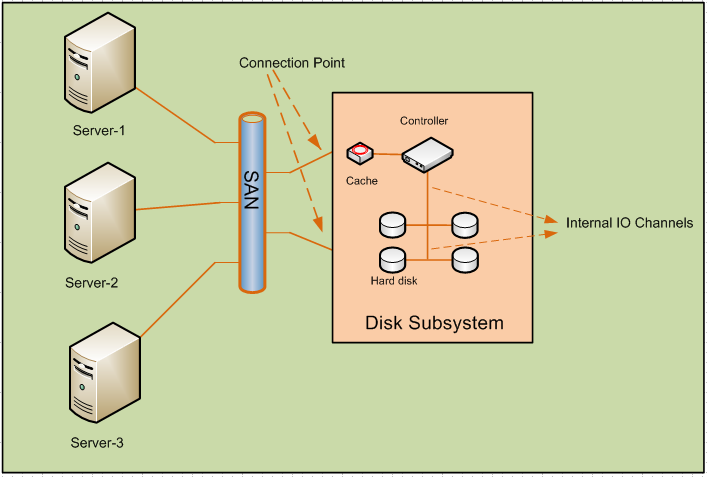
Every intelligent Disk subsystem consists of the below components.


1.SAN:- Server can be connected either directly to the disk subsystem or indirectly via Storage area network. SAN can be made up of SCSI, Fibre channel or iSCSI infrastructure.

2.Connection Points:- Servers are connected to Disk subsystem via connection points. Each subsystem must be connected more than one connection point to provide redundancy. Small Storages have one or two connection points and 6 to 8 hard disks.


3.Controller:- Disk controller are used to handle write and read operation to/from hard disks. With the help of controller, entire disk array appeared as one virtual hard disk to the servers.

Server sends the blocks of data to the controller and its controller responsibility to distribute the data to internal hard disk.

4.Hard disk:-This is the place where actual data is stored. It is very critical to choose the size of the Hard disk as it will limit overall maximum capacity of the storage. More disk in the storage means more read/write heads which will increase the throughput but then maximum capacity of the system will reduce. Application with high throughput will require hard disk with smaller space.

5. Internal IO channels: - It can use vendor proprietary methods or standard IO method i.e SCSI, FC etc.  to connect the controller and internal hard disks.

There are various design methods of Internal IO channel in order to provide redundant path between controller and hard disks.
  •    Active: - Every hard disk is connected to controller only via single IO channel. If it is broken hard disk will be isolated from Controller.
It is the cheapest and simplest method to provide the connectivity but not recommended as there is no redundancy.


  •    Active/Passive: - There are two traces of IO channel but only one path is active at a time. If primary link is down then controller will use backup link to read and write data to the hard disks.


  •    Active/Active No- Load Balancing :- Both the Channel traces are active but hard disk is only using one trace and keeping the other channel as backup.
As shown below Channel-1 is active only for hard disk 1 -3 whereas it is used as backup for Hard disk-2 and 4. Similarly Channel-2 is active for Hard disk 2and 4 and is used as backup for Hard disk1-3.


  •    Active/Active Load Balancing: - All hard disks are connected to controller via two separate IO channels and both the channel is used to perform read and write operation by the controller.
It is the best method to provide high fault tolerance.


6. Cache:- It is used by the controller to increase the read and write speed. There are two types of cache.
  •     Cache on the hard disk:- Generally the speed of IO channel are higher than the speed at which controller can write on the hard disk. So the data is being cached by the hard disk to make IO channel free and can be used for the data towards other hard disks.
  •     Cache on the controller:-Controller has its own cache which caches all the data sent by the servers and allow other servers to send data on the free channel. Controller has its own battery to protect data lose due to power failure.

Fibre channel Protocol stack - Storage Basics-8

 There are five layers in FC protocol stages which are quite similar to the OSI layer.


1. FC0:- It is equivalent to the physical Layer in OSI model. It belongs to the physical layer and defines the cable and connector used for the FC traffic. It sends the data in the form of bits “0” and “1” sequentially.

FC hubs are working in FC0 layer.

2. FC1:- It is responsible for the data encoding. It ensures the data error correction will be done in case of error.
It also performs the link creation and maintenance. It is equivalent to data link layer of OSI model.

8b/10b encoding is used in 1Gig, 2Gig, 4Gig, 8Gig whereas 10Gig and 16Gig standard uses 64b/66b encoding.

3. FC2:- It is the most important layer in FC protocol stack which perform various critical functions. It is equivalent to network OSI layer and is defined in FC-PI-2 standard.
FC switches works on FC2 layer.

FC2 layer performs the below functions:-

  A. Data block size handling: -   It defines how big data payloads   can  be send over the network.  Below are the few key words:-
  • Exchange:- Exchange is the session built between end machines to transmit and receive data. There can be multiple Exchanges between the hosts.
  • Sequence: - Payload or data is made up of big data units called sequence. It ensures the correct order of delivery as well and eliminates the out of order issues.
  • Frames: - Since each link can only sent a defined amount of data size. The big data blocks are broken down to smaller chucks known as Frames. Frames can consist of up to 2112 bytes. If one frame is lost then the entire sequence has to be retransmitted


FC2 not only ensures that the frame has been received successfully at the receiver end but it also makes sure that the frames are been sent or received in sequence.

B. Flow control: - It provides the flow control to avoid the situation at the receivers end and is known as credit limit. It makes sure that both transmitter and receiver are in sync and transmitter will not overload the receiver. It performs two types of flow control:-
  • Buffer-to-buffer credit: - It is also known as link flow control in which both end of the link negotiate data speed.
  • End-to-End flow control:- In End-to-End flow control, the speed is negotiated between transmitter and receiver
C. Addressing:-  Each device in the fabric has its own unique WWNN (world wide node name) and each port gets a 64-bit address called WWPN (world wide port name). As soon as port is up neighbor switch will assign a 24 bit value called FCID to it.

4. FC3:- It performs the below mentioned services as mentioned below. It is not used in FC protocols and can be used by using additional software but not implemented yet.
  • Encryption
  • Mirroring or RAID
  • Compression
5. FC4:- It is used to map the protocol data to the below layer. It encapsulates the data units and sends it to FC2 to perform the lower layer functions.

What is Mirroring? - Storage Basics-7

Mirroring is the process to provide redundancy. Data will be mirrored from one disk to another so that it can provide the fault tolerance in case of disk failure:-

There are two types of mirroring as mentioned below:-

1. Instant Copying: - It mirrors the data locally to the different hard disk in the same enclosure. It can provide redundancy but to a limited extend as it cannot prevent data lose at the time of complete enclosure failure.
2. Remote Mirror: - In remote mirroring, the data will be copied to the hard disk on the different enclosure which may be located on different data center.

·       Synchronous Remote Mirroring: - In synchronous mirroring, server sent the data to the disk-1 and then it mirror the data to Disk-2.  Disk- will only send the acknowledgement to server only after complete mirroring of data.


·       Asynchronous Remote Mirroring:- In asynchronous mirroring, Disk-1 will send the acknowledgement to server once all the data is written on it and simultaneously it will mirror the data to Disk-2. Disk-1 will not wait for the acknowledgement from disk-2 and will send the acknowledgement to server.